JavaScript's Event Loop — Simple Guide (with SVG Timeline)
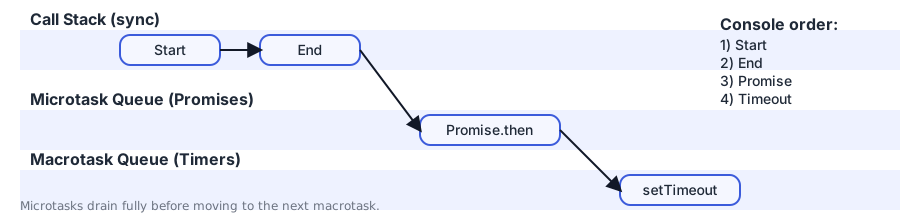
Event loop explained with a clean SVG timeline showing the actual execution order: Start → End → Promise → Timeout.
The event loop lets JavaScript handle async tasks on a single thread.
Example Code
code
console.log("Start");

setTimeout(() => {
  console.log("Timeout");
}, 0);

Promise.resolve().then(() => {
  console.log("Promise");
});

console.log("End");
Output: Start → End → Promise → Timeout
Visual Timeline (SVG)
Why this order?
StartandEndare synchronous → run immediately on the call stack.Promise.thenis a microtask → runs before macrotasks.setTimeoutcallback is a macrotask → runs after microtasks drain.
You made it to the end!
Did this help? Leave a reaction — it takes one second.
Got feedback? 💬
Typo, suggestion, question — I read every message.
Comments

Mohsen Fallahnejad
Writing bite-sized JS, React & Next.js tips
Related
Get new posts in your inbox
No spam. Unsubscribe any time.