Git Rebase vs Git Merge — Simple Guide
Understand the difference between git rebase and git merge with analogies, ASCII diagrams, and visual commit history diagrams.
When working with branches, you often need to bring changes from main into your feature branch. There are two main ways to do this: merge and rebase.
1. Git Merge
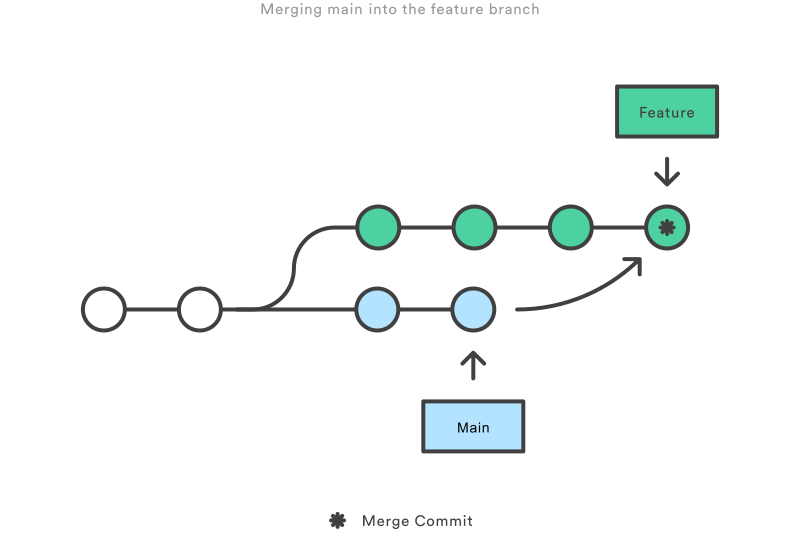
What it does: Combines histories by creating a new merge commit.
History: Keeps both timelines intact (branching visible).
Analogy: Two rivers join into one bigger river.
git checkout feature/login
git merge main
Result (ASCII):
A---B---C  main
     \
      D---E---M  feature/login
Visual diagram:
2. Git Rebase
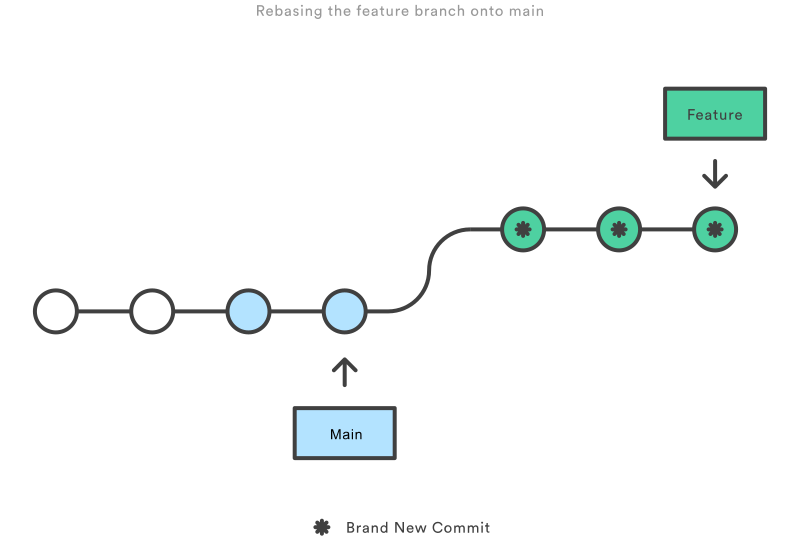
What it does: Moves your branch to start on top of main, rewriting commits.
History: Linear, no merge commit.
Analogy: Pretend you started work after main’s latest changes.
git checkout feature/login
git rebase main
Result (ASCII):
A---B---C---D'---E' feature/login
Visual diagram:
3. When to Use
-
Merge ✅
- Shared branches.
- Preserves history exactly.
- Default in big teams.
-
Rebase ✅
- Personal feature branches (before PR/MR).
- Clean, linear history.
- Avoid on public/shared branches (rewrites history).
4. Quick Mental Model 🧠
- Merge = "Add a commit that says: we combined work."
- Rebase = "Replay my work as if I started from your latest state."
5. Interview Answer
"Merge preserves history with a merge commit, while rebase rewrites commits on top of the target branch for a linear history. Use merge for shared branches, and rebase to clean up local branches before merging."
⚡ That’s it! Now you know when to use merge vs rebase.
Check out the Git Rebase vs Git Merge page for more information.
You made it to the end!
Did this help? Leave a reaction — it takes one second.
Got feedback? 💬
Typo, suggestion, question — I read every message.
Comments

Writing bite-sized JS, React & Next.js tips
Related
Get new posts in your inbox
No spam. Unsubscribe any time.